SkillsBot.org

Angular Developer Skill

angular-developer is the skill published in the angular/skills repository for writing Angular code with Claude. It tells Claude to check your Angular version first and to follow Angular's style guide, and it carries reference files on signals, forms, routing, rendering and testing.

  • License MIT
  • Installs 50K
  • GitHub stars 726
  • Audits 3 of 3 passed

Our hands-on test, by SkillsBot.org

We asked Claude to add a todo list to an Angular 20 app

The angular-developer skill made no visible difference to the code. Both runs wrote the same kind of modern Angular for our Angular 20 app: signals with computed and effect, the @for and @if template syntax, OnPush change detection and no NgModules. Both builds passed with no errors when we installed the dependencies and ran ng build afterwards. The difference was structure. With the skill, Claude split the feature into a todo model, a shared store service and the component. Without it, everything lived in one component. Claude invoked the skill but did not open any of its reference files.

  • InstallWorked1 s with the skills CLI
  • Picked up on its ownYesinvoked angular-developer
  • Time31 s22 s without the skill
  • API cost$0.20$0.11 without the skill

The task, word for word

Add a todo list to this Angular app in src/app/todo-list/: add, toggle and delete todos, show how many are still open, keep them in localStorage, and show the list on the main page. Don't install packages or run the dev server. Don't ask me questions; make reasonable choices and finish.

With the skill

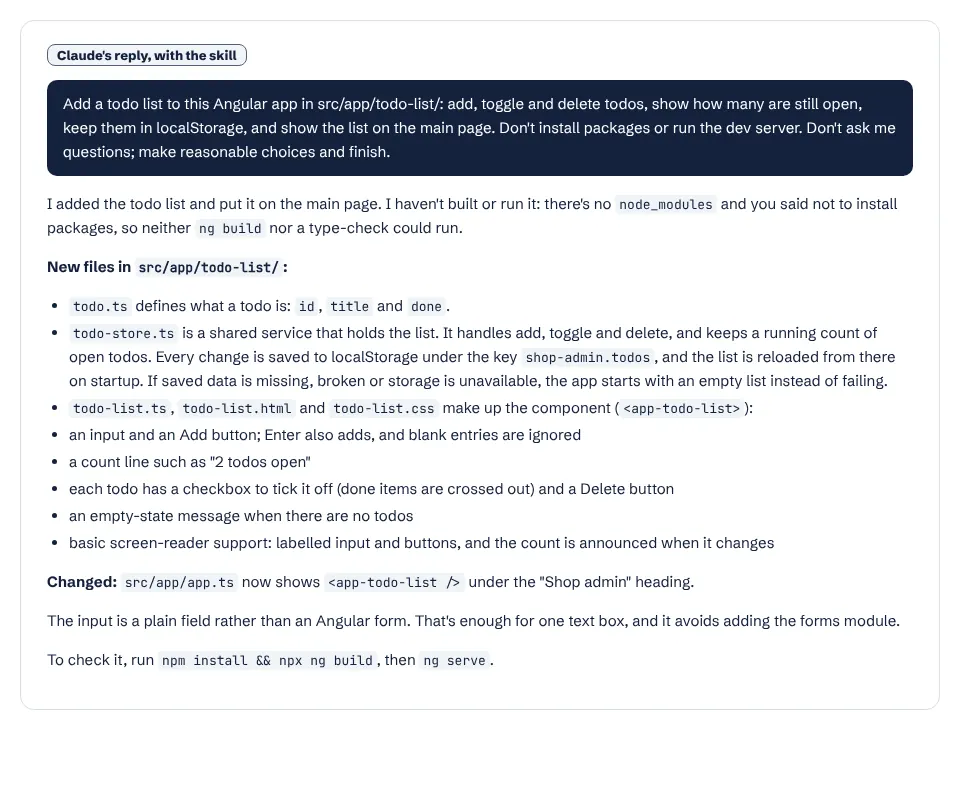
Claude's report with the angular-developer skill: a model, a store service and a component in src/app/todo-list

Without the skill

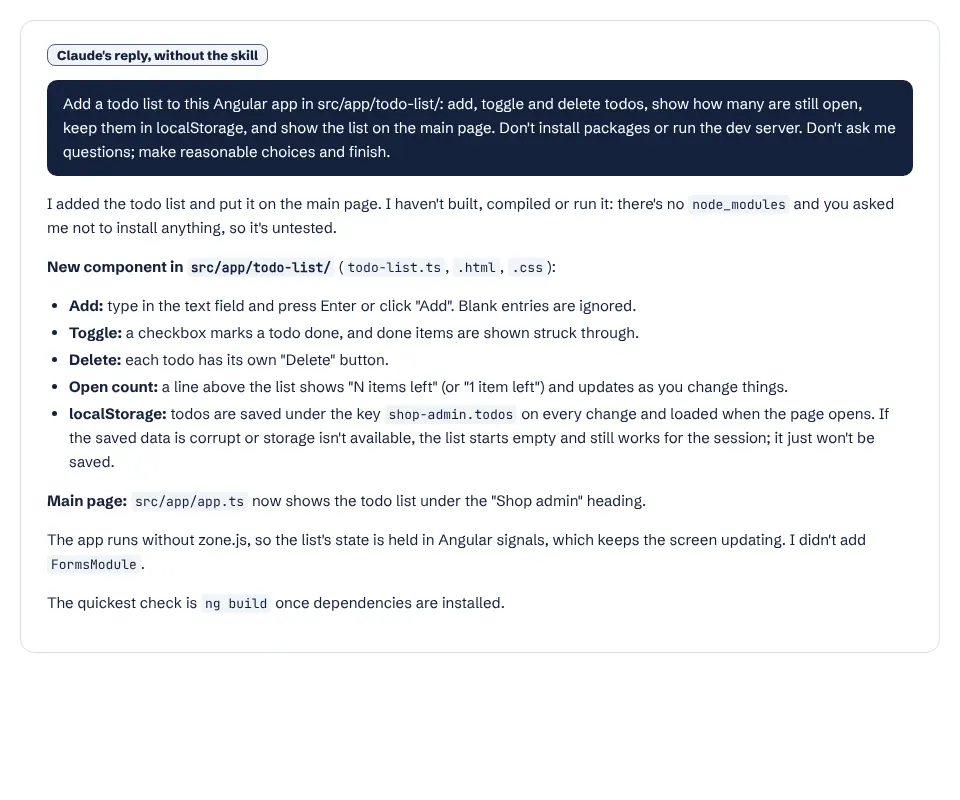
Claude's report without the skill: a single todo-list component
Claude's reports. Both note that they could not build the app because we said not to install packages; we built both afterwards and both passed. Full size: with the skill, without.

What it actually did

  1. Invoked the angular-developer skill unprompted.
  2. Checked package.json for the Angular version, as the skill's first rule says, and read the existing app files.
  3. Wrote todo.ts, todo-store.ts and the todo-list component (TypeScript, HTML and CSS) and added it to the main page.
  4. Did not open any of the skill's reference files.

Where it helped

  • Separated state into an injectable store, which is easier to reuse and test.
  • Added basic screen-reader support: a labelled input and an announced open-todo count.
  • Both versions compiled cleanly with ng build.

Limits we hit

  • Plain Claude already wrote current Angular 20 code, so the skill's guidance was not needed for this task.
  • Claude used only the skill's short top-level rules, not its reference files.
  • 32 seconds and $0.20 against 23 seconds and $0.11.

Use it for

  • Teams whose model defaults to older Angular patterns (NgModules, *ngIf, constructor injection).
  • Larger features touching routing, forms, SSR or testing, where the reference files go deeper.
  • Projects on a specific Angular version: the skill tells Claude to check it first.

One run with the skill and one without, same prompt, fresh folders, Claude Code 2.1.326 in headless mode. How we test skills. Every skill we have tested.

Last updated . The angular-developer skill is made and maintained by angular; SkillsBot.org is an independent directory and is not affiliated with it.

Use angular-developer in Codex, Cursor and GitHub Copilot

angular-developer is a standard Agent Skills folder, so the same files work in other coding agents. Name the agent when you install:

Parts of a skill that rely on Claude Code features, such as subagents or / commands, may behave differently elsewhere. Paths for each agent are in our install guide.

Angular Developer Skill facts

Author
angular
Repository
angular/skills
License
MIT
Installs
50K
GitHub stars
726
First seen on skills.sh
Mar 23, 2026
SKILL.md length
1,238 words
Other files
30

Security audits on skills.sh:

Installs, stars, first-seen date and audits from skills.sh on November 16, 2026. SKILL.md read from GitHub the same day.

What the angular-developer skill does

Its top-level rules are short:

  1. Check the project's Angular version first, because best practices and available features differ between versions. When creating a new project, do not pin a version unless asked.
  2. Follow Angular's style guide, and use the Angular CLI to scaffold components, services, directives, pipes and routes.

Behind those rules sit reference files covering reactivity (signals, linkedSignal, resource, httpResource), queries and content projection, forms, dependency injection, routing, server and hybrid rendering, accessibility, animations, styling with component styles or Tailwind, testing, naming conventions and CLI tooling.

When it triggers

When you create Angular projects, components or services, work on HTTP communication, or ask about any of the topics above.

Good to know

The SKILL.md metadata credits Google LLC, and the skill is MIT-licensed. In our test on an Angular 20 app, plain Claude already wrote current Angular code. See more design and frontend skills.

What is in the angular-developer folder

  • SKILL.mdinstructions
  • references/30 files

Angular Developer Skill: FAQ

How do I install the Angular skill?

Run npx skills add angular/skills --skill angular-developer.

Which Angular versions does it support?

It tells Claude to detect the version in your project and follow the practices for that version.

Does it use the Angular CLI?

Yes. Its guidelines say to use the CLI for scaffolding components, services, directives, pipes and routes.