SkillsBot.org

Excel (xlsx) Skill for Claude

Anthropic's spreadsheet skill. Claude creates and edits .xlsx and .csv files with real formulas, recalculates them, and does not hand back a file with formula errors.

Part of the Anthropic skills collection.

  • License Apache-2.0
  • Installs 200K
  • GitHub stars 195.3K
  • Audits 2 of 3 passed

Our hands-on test, by SkillsBot.org

We gave Claude a CSV and asked for a Q3 workbook

The xlsx skill made Claude build a more careful model: 44 live formulas instead of 27, input-versus-formula colour coding, % of total columns and self-check rows, all verified with the skill's own recalculation script. Without the skill Claude still produced a correct workbook, and was the only run that looked at its chart and fixed a misleading y-axis.

  • InstallWorked3 s with the skills CLI
  • Picked up on its ownYesinvoked xlsx
  • Time43 s47 s without the skill
  • API cost$0.33$0.34 without the skill
  • Output check44 formulas, 0 errors after recalculation, 1 chartWithout: 27 formulas, 0 errors after recalculation, 1 chart

The task, word for word

Turn sales.csv into a workbook called q3_sales.xlsx: a Data sheet with the raw rows plus a revenue column, and a Summary sheet with revenue by month and by region using formulas (not pasted numbers), totals, and a bar chart of monthly revenue. Don't ask me questions; make reasonable choices and finish.

With the skill

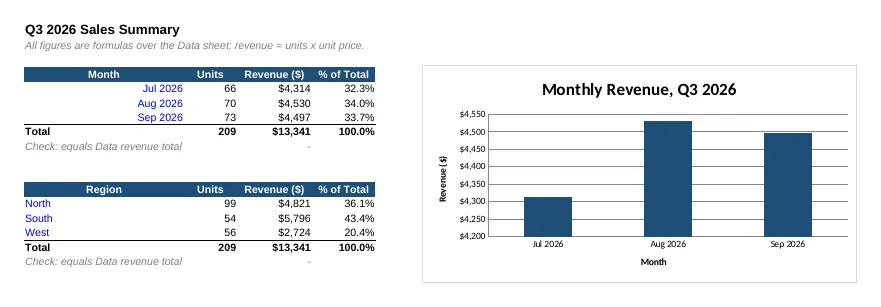
Summary sheet built with the xlsx skill: monthly and regional revenue tables with units and percent of total, and a bar chart whose axis starts at $4,200

Without the skill

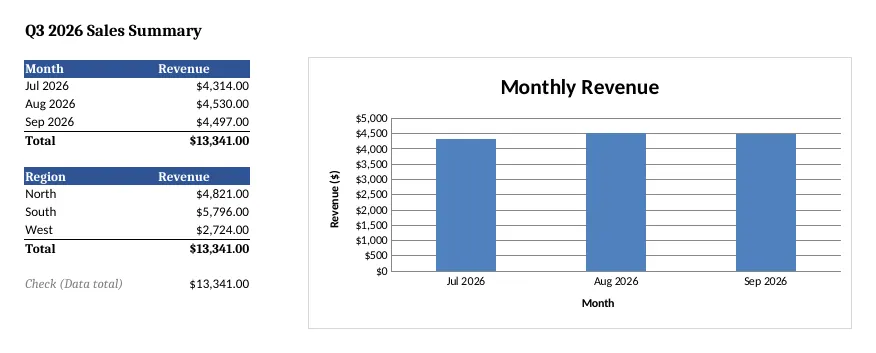
Summary sheet built without the skill: monthly and regional revenue tables and a bar chart whose axis starts at $0
The Summary sheet, rendered in LibreOffice. Both totals are correct ($13,341). With the skill the tables are richer, but the chart's axis starts at $4,200, which exaggerates a 5% difference between months. Full size: with the skill, without.

With the skill

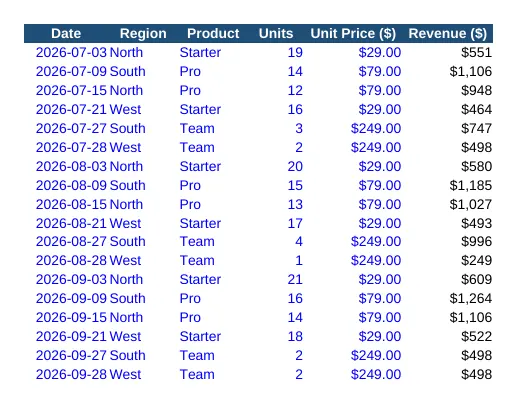
Data sheet built with the xlsx skill, raw values in blue and formulas in black

Without the skill

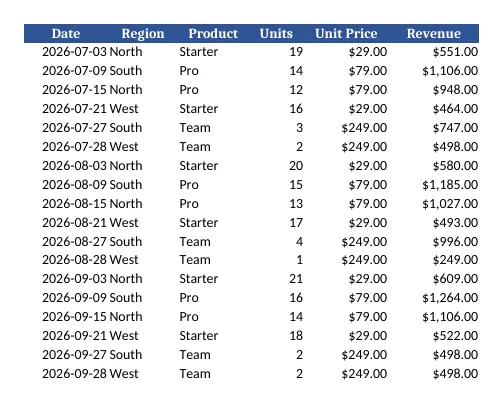
Data sheet built without the skill
The Data sheet. With the skill, hard-coded inputs are blue and formulas black, the financial-model convention the skill asks for. Full size: with the skill, without.
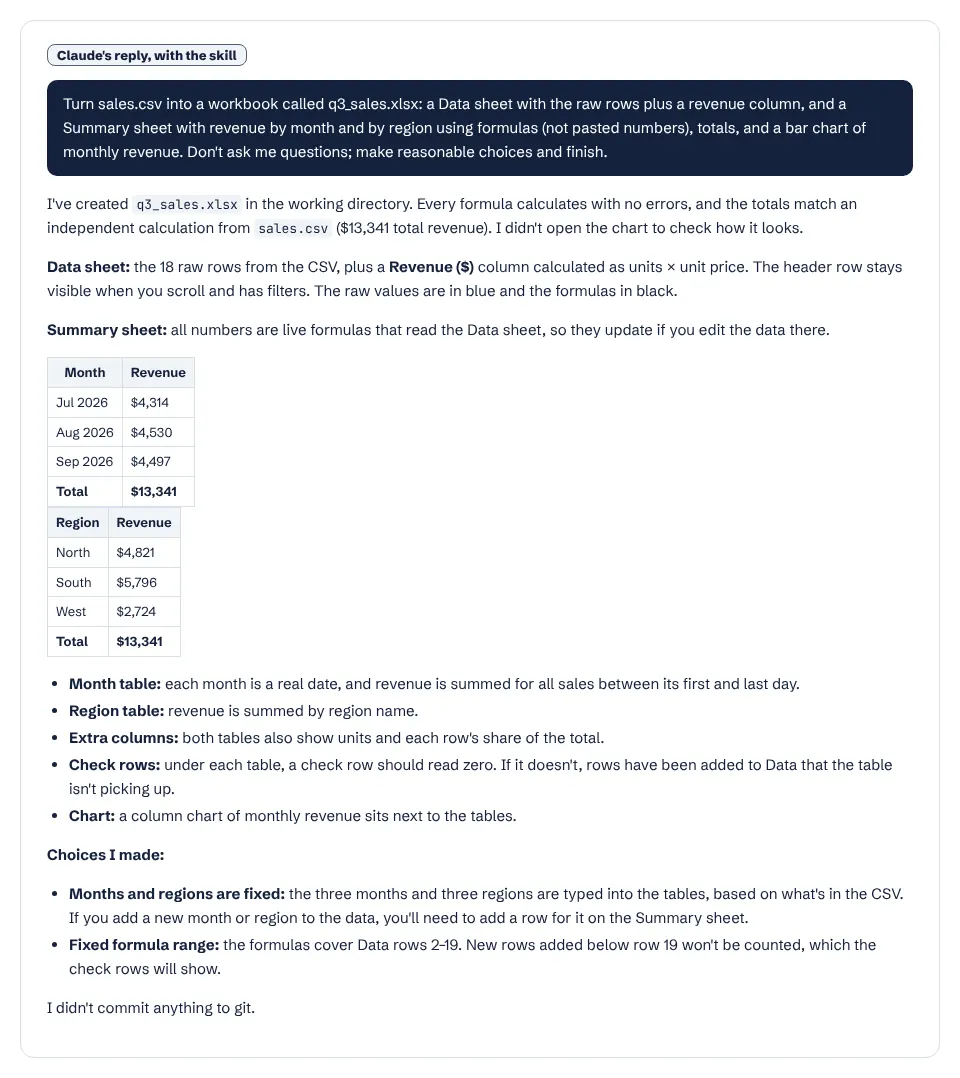
Claude's summary of the workbook it built with the xlsx skill
Claude's own report after the run with the skill. It says plainly that it did not open the chart to check it. Open full size.

What it actually did

  1. Invoked the xlsx skill as soon as it read the request; we did not mention the skill.
  2. Profiled sales.csv with pandas before writing anything.
  3. Wrote an openpyxl build script: a Data sheet with a revenue formula per row and a Summary sheet using SUMIFS by month and by region.
  4. Ran the skill's bundled scripts/recalc.py to recalculate in LibreOffice and confirm zero formula errors.
  5. Cross-checked every Summary figure against totals computed independently in pandas.

Where it helped

  • Formulas, not pasted numbers: 44 formulas, 0 errors after recalculation, exactly what the skill's rules demand.
  • Added check rows that should read zero, so a later edit that breaks a total is visible at once.
  • Colour-coded inputs and formulas and added share-of-total columns without being asked.
  • Used the skill's recalculation script rather than trusting openpyxl, which cannot compute formulas itself.

Limits we hit

  • The skill checks numbers, not visuals: the chart kept a truncated y-axis, and Claude said it had not looked at it. The run without the skill rendered the chart and fixed the axis.
  • Months and regions are typed into the Summary sheet, so new months in the data need a manual edit (Claude pointed this out).
  • Needs Python with openpyxl and pandas, and LibreOffice for recalculation, when used outside the Claude apps.

Use it for

  • Turning CSV exports into a workbook someone else will keep editing.
  • Financial models and budgets where hard-coded numbers would go stale.
  • Cleaning up and restructuring messy spreadsheets while keeping them formula-driven.
  • Add “render the chart and check it” to your prompt if the visuals matter.

One run with the skill and one without, same prompt, fresh folders, Claude Code 2.1.325 in headless mode. How we test skills. Every skill we have tested.

Last updated . The xlsx skill is made and maintained by Anthropic; SkillsBot.org is an independent directory and is not affiliated with it.

Use xlsx in Codex, Cursor and GitHub Copilot

xlsx is a standard Agent Skills folder, so the same files work in other coding agents. Name the agent when you install:

Parts of a skill that rely on Claude Code features, such as subagents or / commands, may behave differently elsewhere. Paths for each agent are in our install guide.

Excel (xlsx) Skill for Claude facts

Author
Anthropic (@anthropics)
Repository
anthropics/skills
License
Apache-2.0
Installs
200K
GitHub stars
195.3K
First seen on skills.sh
Jan 19, 2026
SKILL.md length
1,335 words
Other files
30

Security audits on skills.sh:

Installs, stars, first-seen date and audits from skills.sh on November 16, 2026. SKILL.md read from GitHub the same day.

What the xlsx skill does

The skill triggers whenever a spreadsheet is the main input or output: opening, editing or fixing .xlsx, .xlsm, .xltx, .csv or .tsv files, building a spreadsheet from other data, converting formats, or cleaning messy tables.

Its rules for every file are strict:

  • Formulas, not pasted numbers. Claude writes =SUM(B2:B9) rather than a total it calculated in Python, so the sheet still works when inputs change.
  • Zero formula errors. A recalculation step reports errors, and Claude does not deliver the file while any remain.
  • Follow the spec literally: exact tab names, column headers and formulas.
  • A professional font such as Arial throughout, unless you ask otherwise.

It also has a section on financial models and a list of openpyxl pitfalls.

What it needs

openpyxl, pandas and markitdown for Python, and LibreOffice for recalculation. The Claude apps already include them.

What is in the xlsx folder

  • SKILL.mdinstructions
  • LICENSE.txt
  • scripts/29 files

Excel (xlsx) Skill for Claude: FAQ

Is there a Claude skill for Excel?

Yes, this one. Anthropic's xlsx skill handles Excel and CSV files. In the Claude apps it is built in; in Claude Code install it with npx skills add anthropics/skills --skill xlsx.

Will Claude keep my formulas?

The skill tells Claude to use formulas instead of hard-coded results and to check the file for formula errors after recalculating.

Can it build financial models?

The skill includes a section on financial models. As with any model, check the assumptions and formulas before you rely on it.