SkillsBot.org

PowerPoint (pptx) Skill for Claude

Anthropic's skill for slide decks. Claude builds presentations with pptxgenjs, edits existing decks and templates, reads slides and notes, and checks the result visually.

Part of the Anthropic skills collection.

  • License Apache-2.0
  • Installs 256K
  • GitHub stars 195.3K
  • Audits 1 of 3 passed

Our hands-on test, by SkillsBot.org

We asked Claude for a 6-slide Q3 review deck

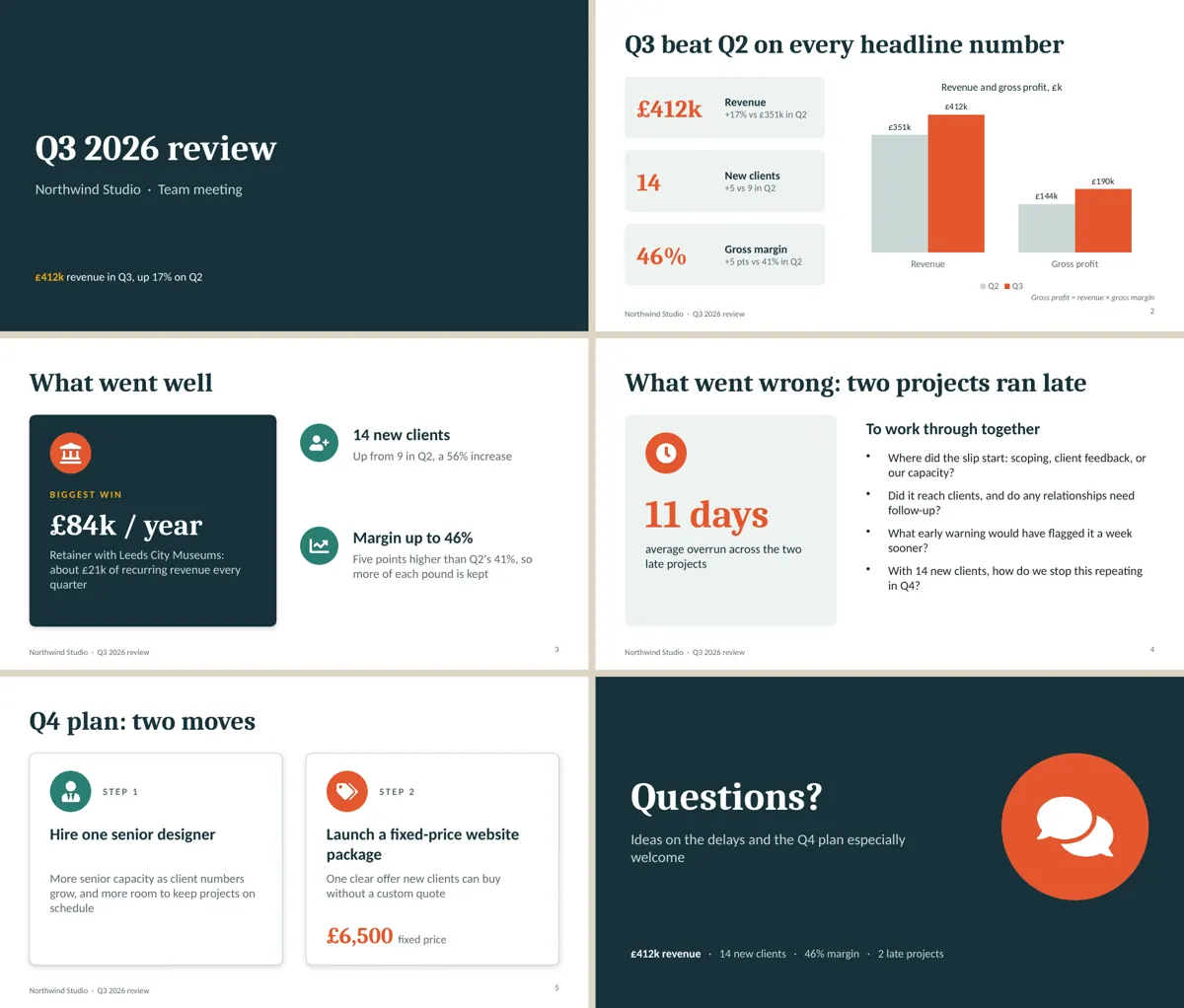
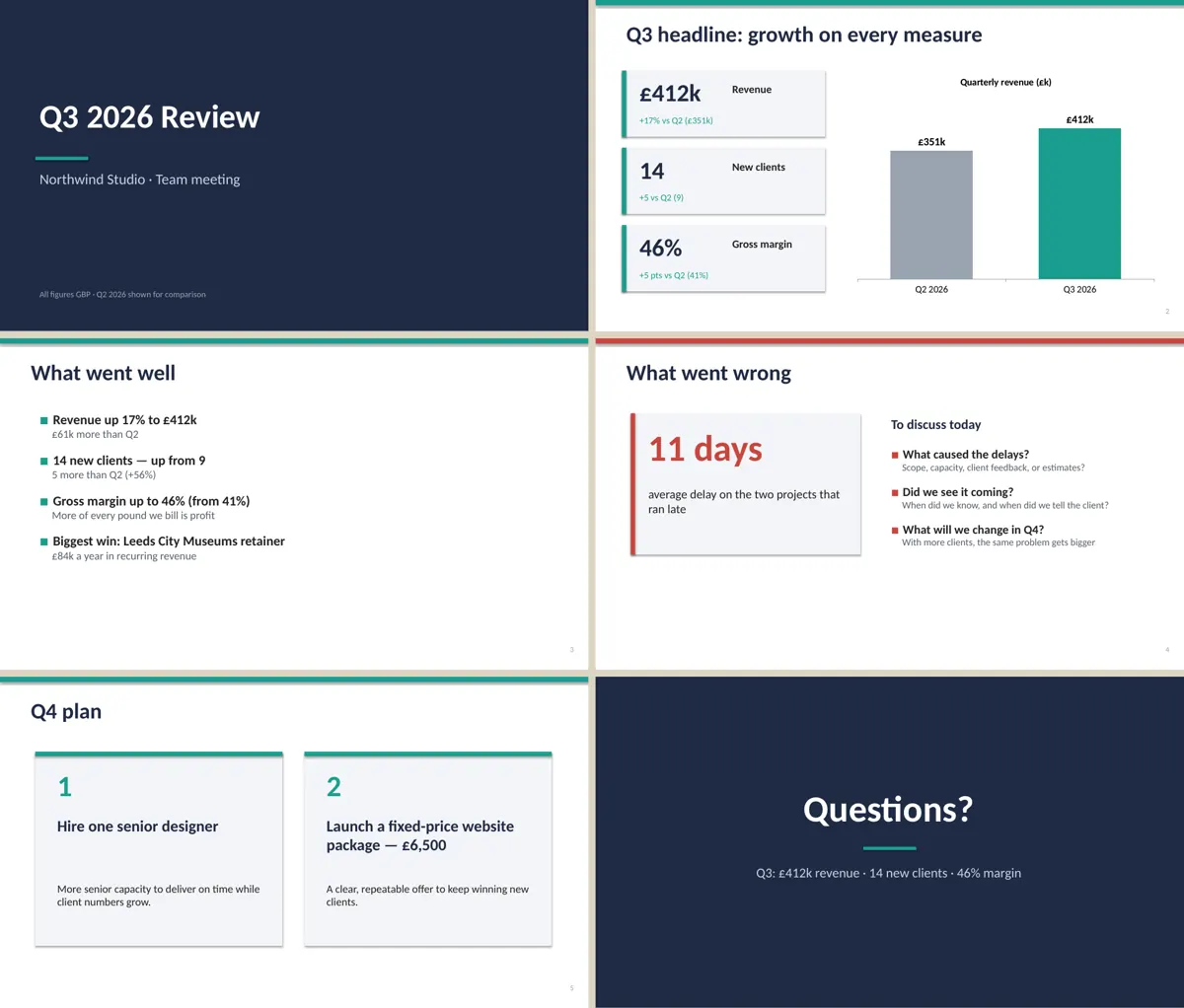
The pptx skill produced the more finished deck: a serif-and-sans type pairing, icons on every content slide, a two-series native chart and a footer with slide numbers. The deck without the skill was correct and tidy but plainer, built from bullet lists and a single-series chart. The polish cost more than twice the time and money: 2 min 17 s and $0.66 against 60 s and $0.23.

  • InstallWorked2 s with the skills CLI
  • Picked up on its ownYesinvoked pptx
  • Time2 min 17 s1 min 0 s without the skill
  • API cost$0.66$0.23 without the skill
  • Output check6 slides, 1 chart, notes on 6Without: 6 slides, 1 chart, notes on 6

The task, word for word

Make a 6-slide deck, q3_review.pptx, from the numbers in q3.txt for a 10-minute team meeting: title, headline numbers, what went well, what went wrong, Q4 plan, questions. Include at least one chart. Don't ask me questions; make reasonable choices and finish.

With the skill

All six slides of the deck made with the pptx skill: dark title slide, headline numbers with a two-series chart, icon cards, an 11 days callout, two Q4 step cards and a questions slide

Without the skill

All six slides of the deck made without the skill: title slide, headline numbers with a revenue chart, a bulleted list, an 11 days callout, two numbered cards and a questions slide
Every slide from both decks, rendered in LibreOffice. Both use the real numbers from q3.txt and neither invents a cause for the late projects. Full size: with the skill, without.

With the skill

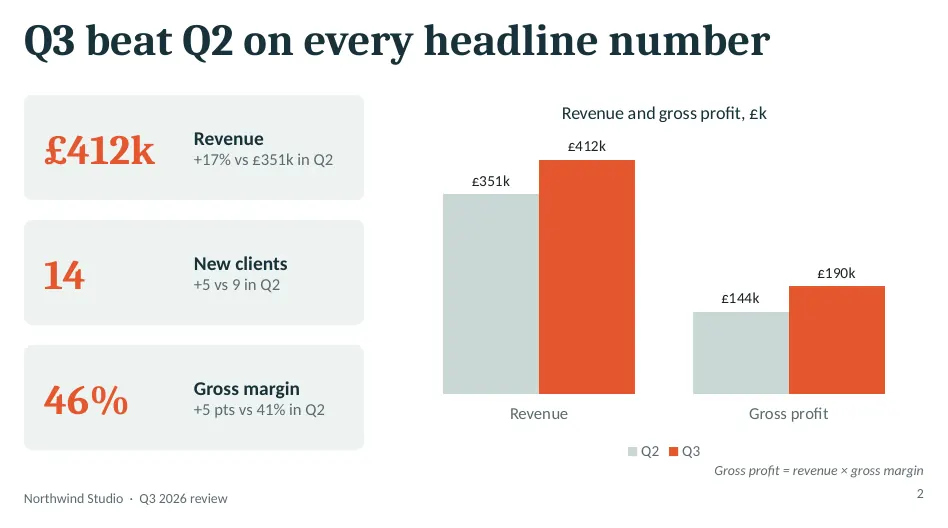
Headline numbers slide with the skill: revenue, clients and margin cards and a revenue and gross profit chart

Without the skill

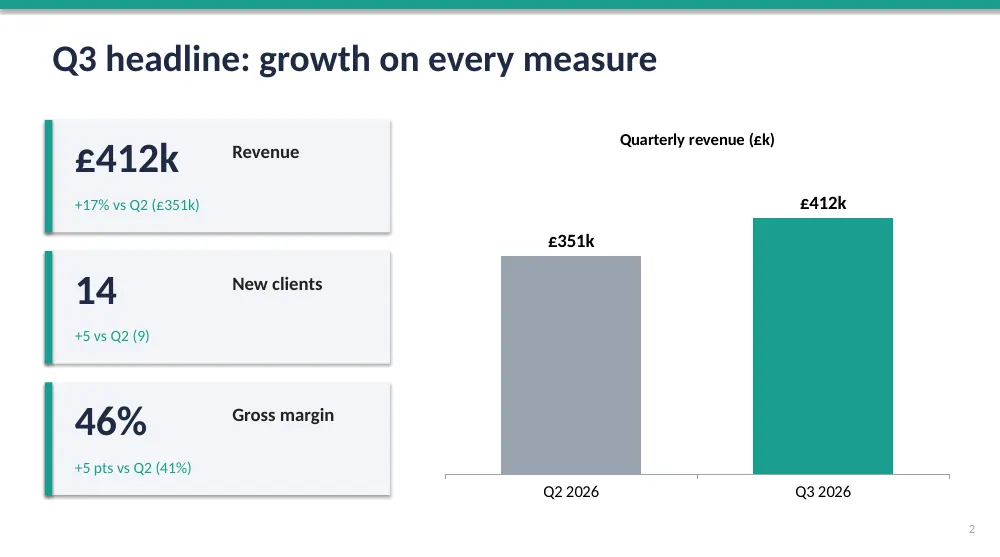
Headline numbers slide without the skill: three number cards and a revenue chart
Slide 2 up close. With the skill, Claude added gross profit to the chart, a figure it calculated from revenue × margin, and labelled it as a calculation on the slide. Full size: with the skill, without.
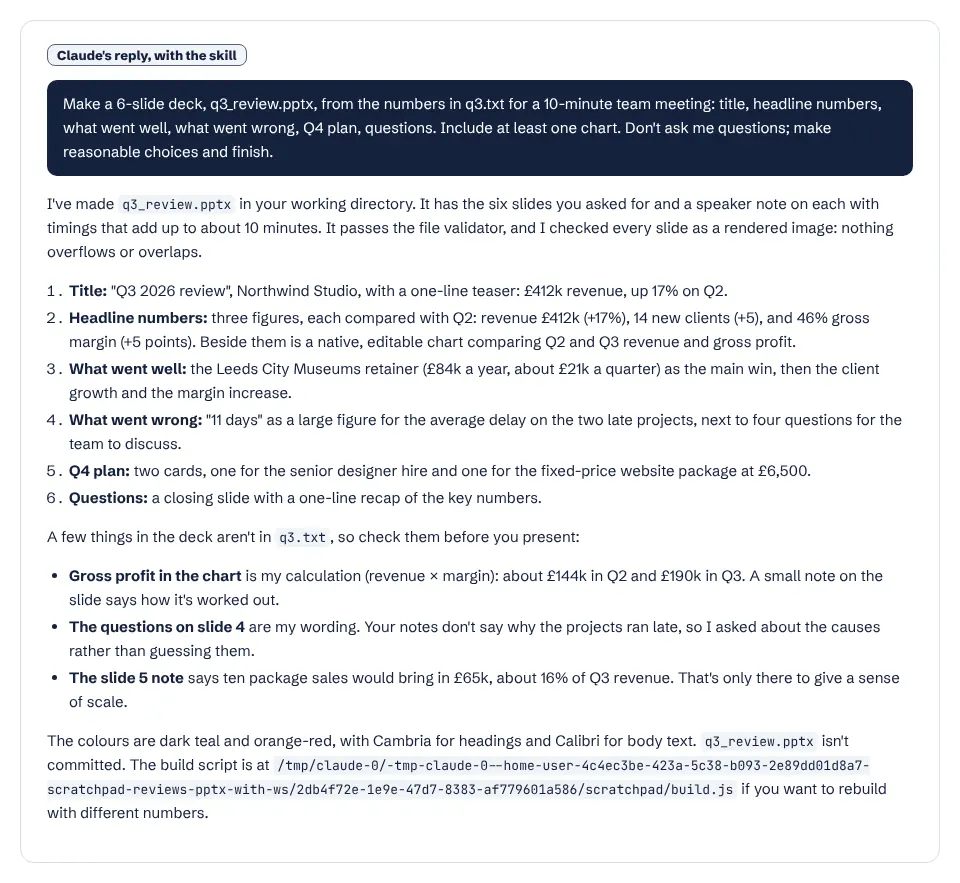
Claude's report after the pptx skill run
Claude's report. It lists everything in the deck that was not in the notes, such as the gross profit figures and the discussion questions. Open full size.

What it actually did

  1. Invoked the pptx skill unprompted and checked which of the skill's dependencies were installed.
  2. Installed pptxgenjs, react-icons and sharp with npm, as the skill's workflow expects, to build the deck in JavaScript with rendered icons.
  3. Wrote a structured build script with a shared layout, then rendered every slide to images with the skill's scripts.
  4. Fixed title alignment after looking at the renders, re-ran the skill's validator, and added speaker notes timed to about 10 minutes.

Where it helped

  • Looks like a designed deck rather than a template: consistent colours, icons, big-number callouts and slide numbers.
  • Native, editable chart (not an image) and speaker notes on all six slides.
  • Visual QA was real: Claude checked rendered slides and fixed what it saw before finishing.
  • Transparent about added content, and did not invent a reason for the late projects.

Limits we hit

  • Slower and dearer: 137 s and $0.66, against 60 s and $0.23 without the skill.
  • Pulled in npm packages (pptxgenjs, react-icons, sharp) on a machine that lacked them; expect the same on your own setup.
  • Seven icon images per deck add file size, and the gross profit chart shows derived numbers your notes never contained.

Use it for

  • Team and client decks that need to look finished, not just correct.
  • Building on a company template (.potx) while keeping its layouts.
  • Pulling text and speaker notes out of an existing deck.
  • For a quick internal outline, plain Claude is faster and cheaper.

One run with the skill and one without, same prompt, fresh folders, Claude Code 2.1.325 in headless mode. How we test skills. Every skill we have tested.

Last updated . The pptx skill is made and maintained by Anthropic; SkillsBot.org is an independent directory and is not affiliated with it.

Use pptx in Codex, Cursor and GitHub Copilot

pptx is a standard Agent Skills folder, so the same files work in other coding agents. Name the agent when you install:

Parts of a skill that rely on Claude Code features, such as subagents or / commands, may behave differently elsewhere. Paths for each agent are in our install guide.

PowerPoint (pptx) Skill for Claude facts

Author
Anthropic (@anthropics)
Repository
anthropics/skills
License
Apache-2.0
Installs
256K
GitHub stars
195.3K
First seen on skills.sh
Jan 20, 2026
SKILL.md length
4,199 words
Other files
30

Security audits on skills.sh:

Installs, stars, first-seen date and audits from skills.sh on November 16, 2026. SKILL.md read from GitHub the same day.

What the pptx skill does

It triggers whenever a .pptx or .potx file is involved, or when you mention a deck, slides or a presentation. It splits work by task:

Task Approach
Create a new deck Write a pptxgenjs script and build a structured deck
Edit a deck or start from a template Unzip the file, edit the slide XML, zip it again
Read a deck Extract each slide's text, tables, chart data and speaker notes as Markdown, or render a thumbnail grid

Design and QA

Beyond the mechanics, the skill has guidance on deck flow, colour palettes, typography, spacing and common mistakes. Its QA section is required: content checks, file checks and a visual check of rendered slides before the deck is delivered.

What it needs

pptxgenjs from npm, python-pptx, Pillow, defusedxml and lxml from pip, LibreOffice and Poppler. The Claude apps already include them.

What is in the pptx folder

  • SKILL.mdinstructions
  • LICENSE.txt
  • scripts/29 files

PowerPoint (pptx) Skill for Claude: FAQ

Can Claude make a PowerPoint presentation?

Yes. With the pptx skill Claude writes a pptxgenjs script that builds the deck, then checks it visually. In the Claude apps the skill is built in.

Can Claude use my company template?

Yes. The skill edits existing decks and .potx templates directly, so your layouts and theme stay intact.

Can it read speaker notes?

Yes. Its slide_text script extracts every slide's title, text, tables, chart data, alt text and speaker notes.