SkillsBot.org

unslop Skill

unslop is Cursor's skill for editing text to remove the patterns that make writing read as AI-generated. Type /unslop with your text or a file, and Claude checks it against a numbered list of tells and rewrites it.

  • License Not stated
  • Installs 36K
  • GitHub stars 16.5K
  • Audits 3 of 3 passed

Our hands-on test, by SkillsBot.org

We asked Claude to strip the AI tells from a product announcement

unslop gave almost the same rewrite as plain Claude. Our 197-word launch post was full of tells: “landscape”, “testament”, an em dash, “not just an update”, bold labels that repeated themselves, and a hype ending. Both runs cut it to under 90 words, kept every fact and gave it the same sentence-case heading. Without the skill, Claude said there was no /unslop command and did the rewrite from its own sense of AI style. With it, the edit followed a few of the skill's numbered rules more closely: active voice for the upgrade date, and the closing request for feedback removed.

  • InstallWorked2 s with the skills CLI
  • Picked up on its ownRun with /unslopClaude won't load it on its own
  • Time16 s13 s without the skill
  • API cost$0.20$0.22 without the skill

The task, word for word

/unslop announcement.md - rewrite it and save the result as announcement_clean.md. Don't ask me questions; make reasonable choices and finish.

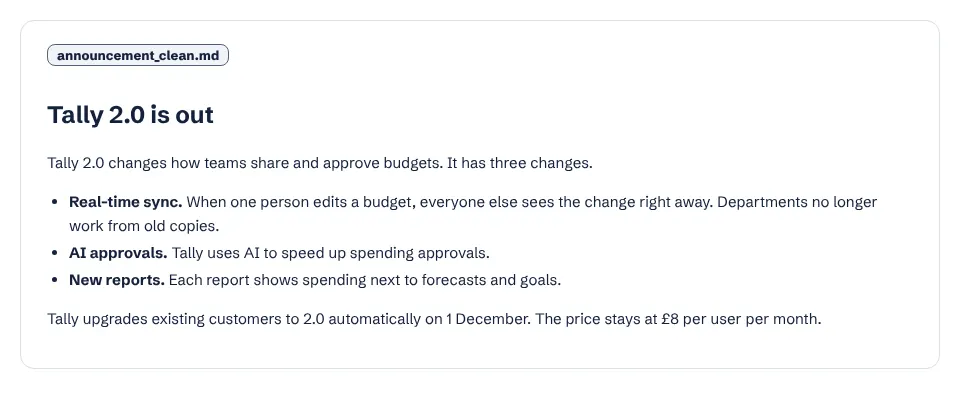
With the skill

The announcement rewritten with the unslop skill: a short heading, two sentences, three bullets and the upgrade date

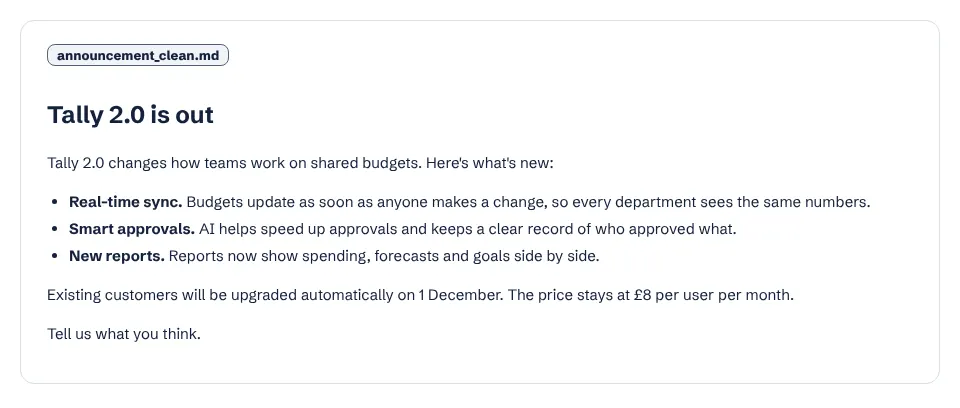
Without the skill

The same announcement rewritten without the skill, nearly identical in shape and length
announcement_clean.md from each run. The two rewrites differ by a few phrases: “Tally upgrades existing customers” against “Existing customers will be upgraded”, and only the run without the skill kept “Tell us what you think.” Full size: with the skill, without.

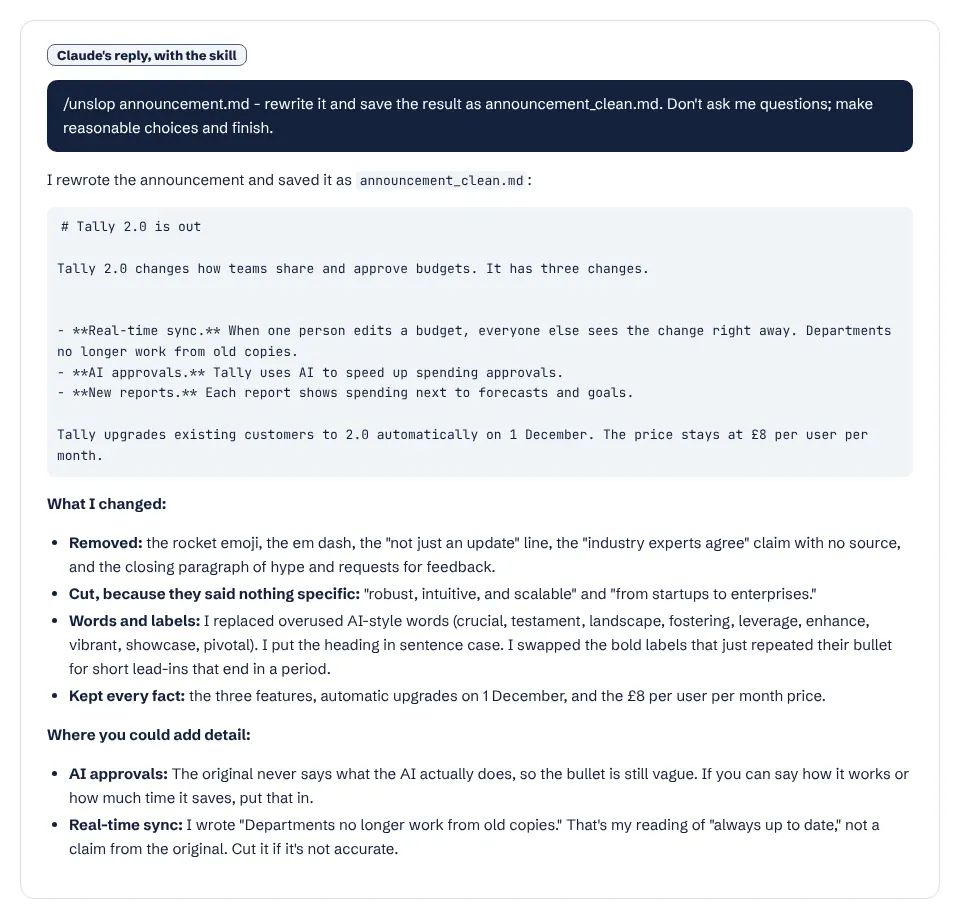
With the skill

Claude's report with the skill, listing the AI words it replaced and where the copy still needs detail

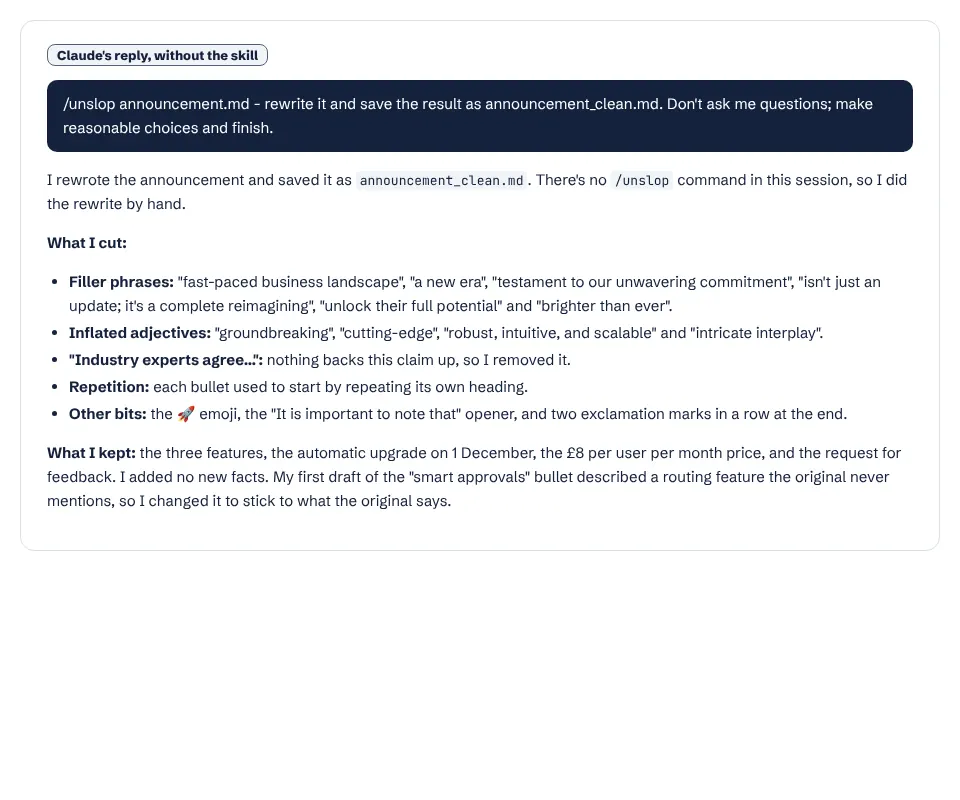
Without the skill

Claude's report without the skill, noting there was no /unslop command and listing what it cut
Claude's reports. With the skill it also pointed out that the AI approvals bullet stays vague because the original never says what the AI does. Full size: with the skill, without.

What it actually did

  1. Loaded unslop through the /unslop command. The skill turns off automatic use, so typing the command is the only way to run it.
  2. Read the announcement once and wrote the rewrite in one pass, then made a small edit.
  3. Removed the emoji, the em dash, the “not just an update” line, the unsourced “industry experts agree” claim and the hype ending.
  4. Replaced the AI words the skill lists (crucial, testament, landscape, fostering, leverage, enhance, vibrant, showcase, pivotal) and turned the bold labels into short lead-ins that end in a period, which the skill allows.
  5. Listed what it changed and where the copy still needs facts.

Where it helped

  • Kept every fact: three features, automatic upgrade on 1 December, £8 per user per month.
  • Flagged the one sentence it had inferred (“Departments no longer work from old copies”) so we could cut it if it was wrong.
  • Fast: about 16 seconds.

Limits we hit

  • Plain Claude produced nearly the same text, so on a short, obvious case like this the skill adds little.
  • Its own report to us used bold labels followed by colons, a pattern close to one the skill tells it to remove from the text.
  • “It has three changes” right after “changes how teams…” reads awkwardly.

Use it for

  • Long drafts where a fixed checklist catches more than a quick read.
  • Teams that want the same style rules applied every time, such as no em dashes and sentence-case headings.
  • Docs and READMEs: the jargon and plain-speech rules (26 to 33) target technical writing.
  • Type /unslop yourself; Claude will not reach for it unprompted.

One run with the skill and one without, same prompt, fresh folders, Claude Code 2.1.326 in headless mode. How we test skills. Every skill we have tested.

Last updated . The unslop skill is made and maintained by Cursor; SkillsBot.org is an independent directory and is not affiliated with it.

Use unslop in Codex, Cursor and GitHub Copilot

unslop is a standard Agent Skills folder, so the same files work in other coding agents. Name the agent when you install:

Parts of a skill that rely on Claude Code features, such as subagents or / commands, may behave differently elsewhere. Paths for each agent are in our install guide.

unslop Skill facts

Author
Cursor (@cursor)
Repository
cursor/plugins
License
Not stated
Installs
36K
GitHub stars
16.5K
First seen on skills.sh
May 24, 2026
SKILL.md length
878 words
Other files
None

Security audits on skills.sh:

Installs, stars, first-seen date and audits from skills.sh on November 16, 2026. SKILL.md read from GitHub the same day.

What the unslop skill does

The whole skill is one SKILL.md, a list of numbered rules. Claude scans the text for each pattern, rewrites it, and keeps the meaning and the intended tone. The rule numbers are fixed so other skills can refer to them.

Content and language. Cut "-ing" add-ons such as "highlighting..." or "fostering...", and vague sources like "experts believe". Replace a list of AI words (delve, crucial, pivotal, tapestry, testament, vibrant and others) with plain ones, say "is" instead of "serves as", and drop "not just X, but Y".

Style. No em dashes at all, colons only before a list or example, little bold, sentence-case headings, no decorative emojis and straight quotes. A bold label followed by a colon that restates the line becomes prose.

Filler and jargon. "In order to" becomes "to", stacked hedges collapse to one word, and generic endings like "the future looks bright" go. Abstract metaphor nouns (surface, primitive, north star, flywheel) give way to the concrete word.

Plain speech. Say what something does, with a mechanism or a number, rather than how it feels. One idea per sentence, active voice, fewer adverbs, plain words over "utilize" and "leverage", and whole sentences instead of arrows and abbreviations.

When it runs

The skill sets disable-model-invocation, so Claude never picks it up by itself. Type /unslop followed by the text or a file name.

Good to know

In our test on a short launch post, plain Claude's rewrite was almost the same. The rules matter more on long drafts and technical docs, where a checklist catches what a quick read misses. For more writing skills, see the marketing category.

unslop Skill: FAQ

How do I install the unslop skill?

Run npx skills add cursor/plugins --skill unslop. It comes from Cursor's plugins repository.

Why doesn't Claude use unslop automatically?

Its SKILL.md turns off automatic invocation. Type /unslop with the text or file you want edited.

Does unslop change the facts in my text?

It is told to preserve meaning. In our test it kept every fact and flagged the one sentence it had inferred.