SkillsBot.org

show-me Skill

show-me, from HumanLayer, is a short skill for understanding code visually. Type /show-me and a question, and Claude answers with the smallest view that makes the point: pseudocode, a call tree, a component tree, a file tree or a focused HTML diagram.

  • License MIT
  • Installs 38K
  • GitHub stars 5.8K
  • Audits 3 of 3 passed

Our hands-on test, by SkillsBot.org

We asked Claude to show us how an invoice total is calculated

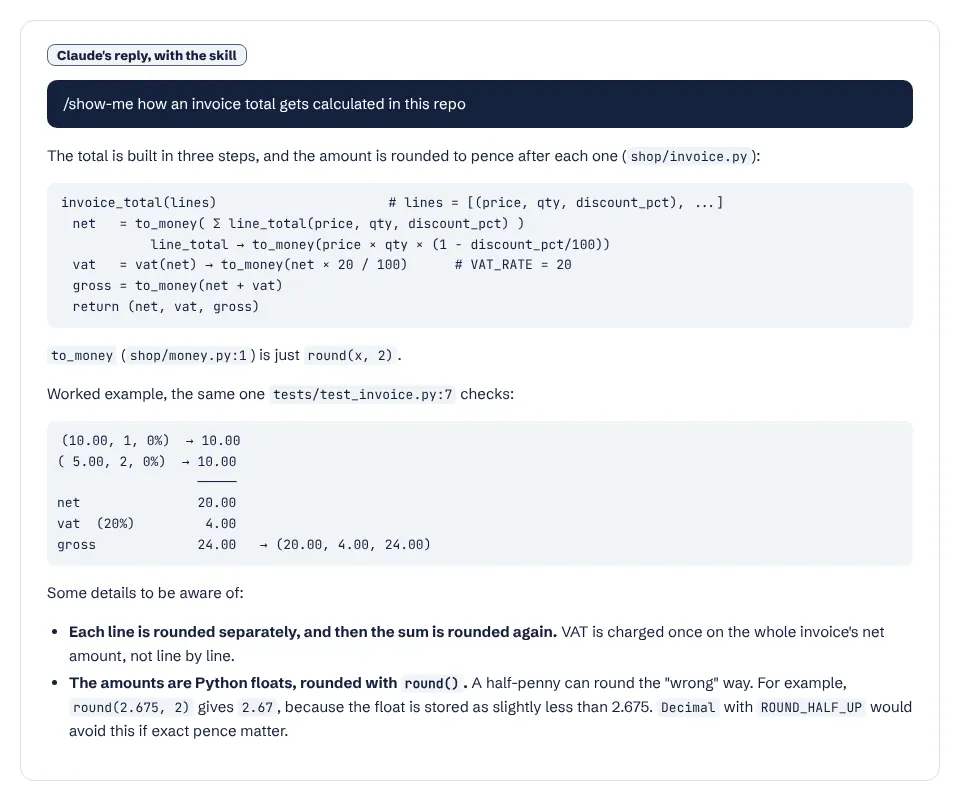
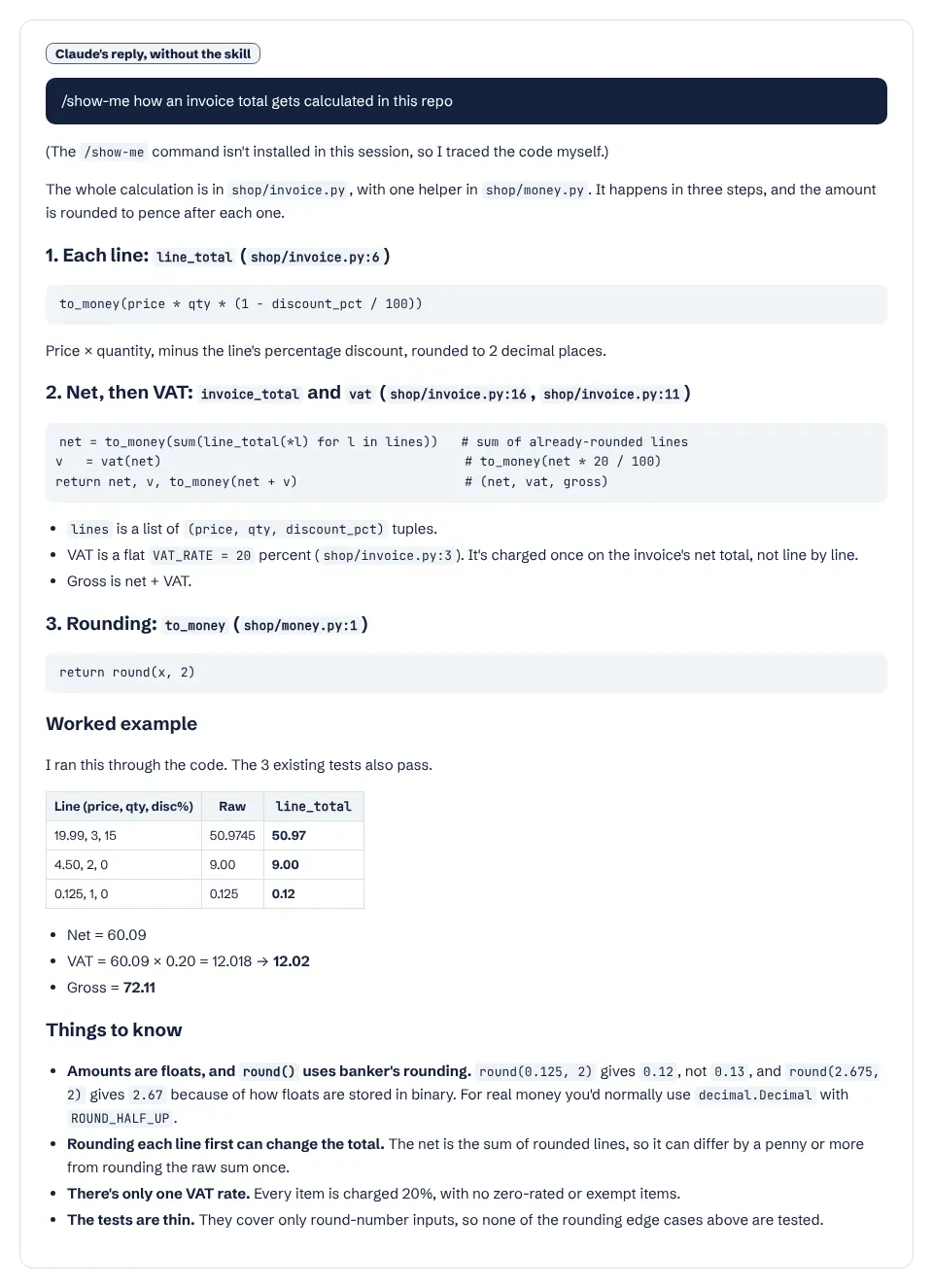
show-me changed the shape of the answer, as it says it will. With the skill, Claude answered with one compact call tree of the calculation, a worked example taken from the repo's own test and a few short notes, in 11 seconds. Without the skill, Claude said the command was not installed, then wrote a longer guide with headings for each step, a table and a worked example it had run through the code. Both explanations were correct and both flagged the float rounding problem in the code.

  • InstallWorked1 s with the skills CLI
  • Picked up on its ownRun with /show-meClaude won't load it on its own
  • Time10 s16 s without the skill
  • API cost$0.09$0.08 without the skill

The task, word for word

/show-me how an invoice total gets calculated in this repo

With the skill

Claude's answer with show-me: a single call-tree sketch of invoice_total, line_total and vat, then a worked example

Without the skill

Claude's answer without the skill: a step-by-step explanation with headings, code excerpts and a results table
The two answers. With the skill the explanation is one diagram-like sketch; without it, a longer walkthrough. Full size: with the skill, without.

What it actually did

  1. Loaded the skill through the /show-me command; it turns off automatic use.
  2. Read money.py and invoice.py.
  3. Answered with a call-tree sketch of invoice_total and the functions it calls, a worked example from tests/test_invoice.py, and short caveats.

Where it helped

  • Fast and short: 11 seconds, one sketch the reader can take in at a glance.
  • Cited file and line references in the sketch.
  • Still flagged the half-penny rounding problem with floats.

Limits we hit

  • Plain Claude's longer answer verified its example by running the code; the skill's run did not.
  • No HTML diagram here: the skill picks the smallest view that makes the point, which for this code was text.

Use it for

  • Getting oriented in unfamiliar code: control flow, component trees and file responsibilities.
  • Explaining a change or a bug visually during a session.
  • Type /show-me yourself; Claude will not use it unprompted.

One run with the skill and one without, same prompt, fresh folders, Claude Code 2.1.326 in headless mode. How we test skills. Every skill we have tested.

Last updated . The show-me skill is made and maintained by humanlayer; SkillsBot.org is an independent directory and is not affiliated with it.

Use show-me in Codex, Cursor and GitHub Copilot

show-me is a standard Agent Skills folder, so the same files work in other coding agents. Name the agent when you install:

Parts of a skill that rely on Claude Code features, such as subagents or / commands, may behave differently elsewhere. Paths for each agent are in our install guide.

show-me Skill facts

Author
humanlayer
Repository
humanlayer/skills
License
MIT
Installs
38K
GitHub stars
5.8K
First seen on skills.sh
Aug 10, 2026
SKILL.md length
438 words
Other files
1

Security audits on skills.sh:

Installs, stars, first-seen date and audits from skills.sh on November 16, 2026. SKILL.md read from GitHub the same day.

What the show-me skill does

The skill tells Claude to skip the preamble, keep prose brief and pick the smallest view that makes the key point clear. Its examples:

  • Logic or an algorithm as pseudocode.
  • Runtime control flow as a call tree.
  • UI structure as a component tree, with the state and module boundaries that matter.
  • File responsibilities or a broad refactor as a shallow file tree.
  • Anything that needs more as a focused HTML artifact.

When it runs

The skill turns off automatic invocation, so it runs only when you type /show-me.

Good to know

It is a single short SKILL.md under the MIT license, in HumanLayer's skills repository. See more coding skills.

What is in the show-me folder

  • SKILL.mdinstructions
  • agents/1 file

show-me Skill: FAQ

How do I install the show-me skill?

Run npx skills add humanlayer/skills --skill show-me, then type /show-me followed by your question.

Does show-me always make a diagram?

No. It picks the smallest view that makes the point. In our test that was a text call tree, not an HTML diagram.

Why does Claude not use show-me automatically?

Its SKILL.md disables model invocation, so only the /show-me command runs it.