SkillsBot.org

diagram-design Skill

diagram-design, by GitHub user cathrynlavery, is a skill for drawing diagrams as self-contained HTML files with inline SVG, in one consistent and brandable style. It covers architecture, flowcharts, sequence diagrams, timelines, Sankey charts, Wardley maps and dozens more types.

  • License MIT
  • Installs 29K
  • GitHub stars 67.3K
  • Audits 3 of 3 passed

Our hands-on test, by SkillsBot.org

We asked Claude to draw a checkout system's architecture

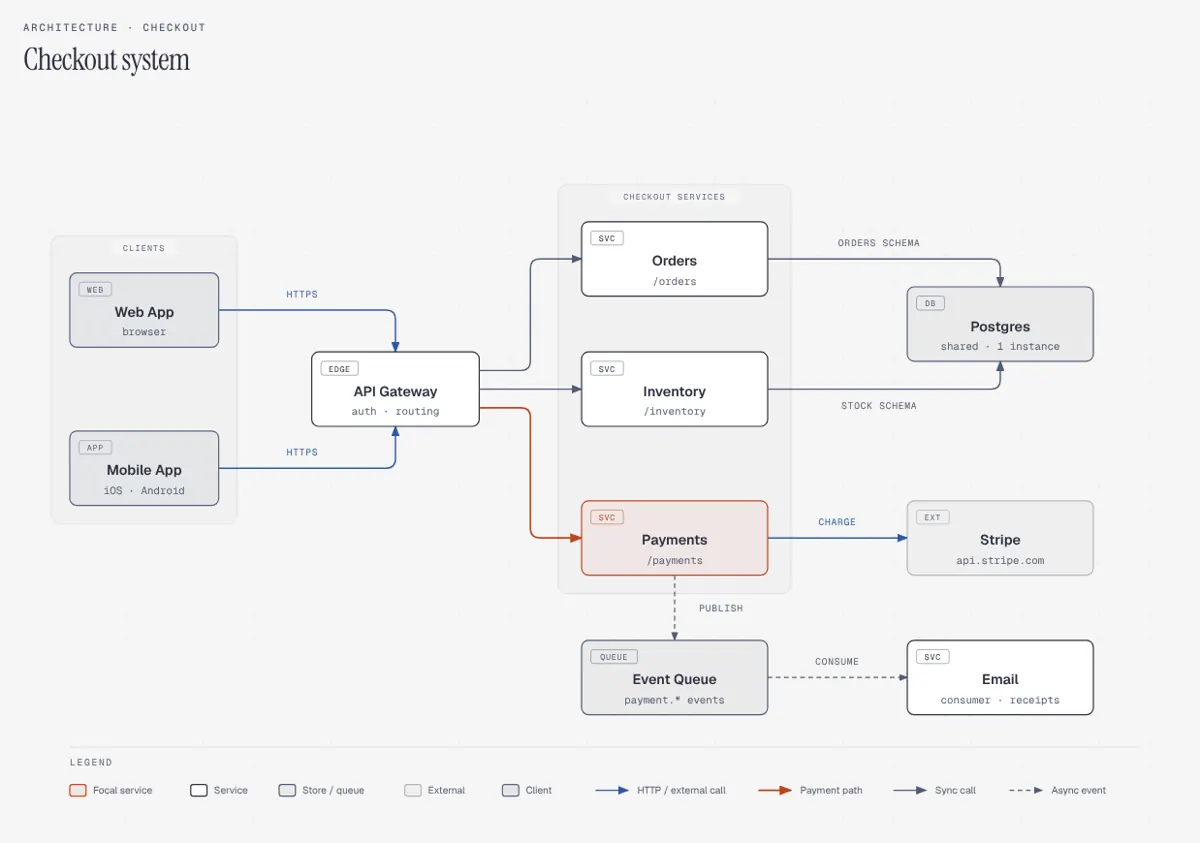
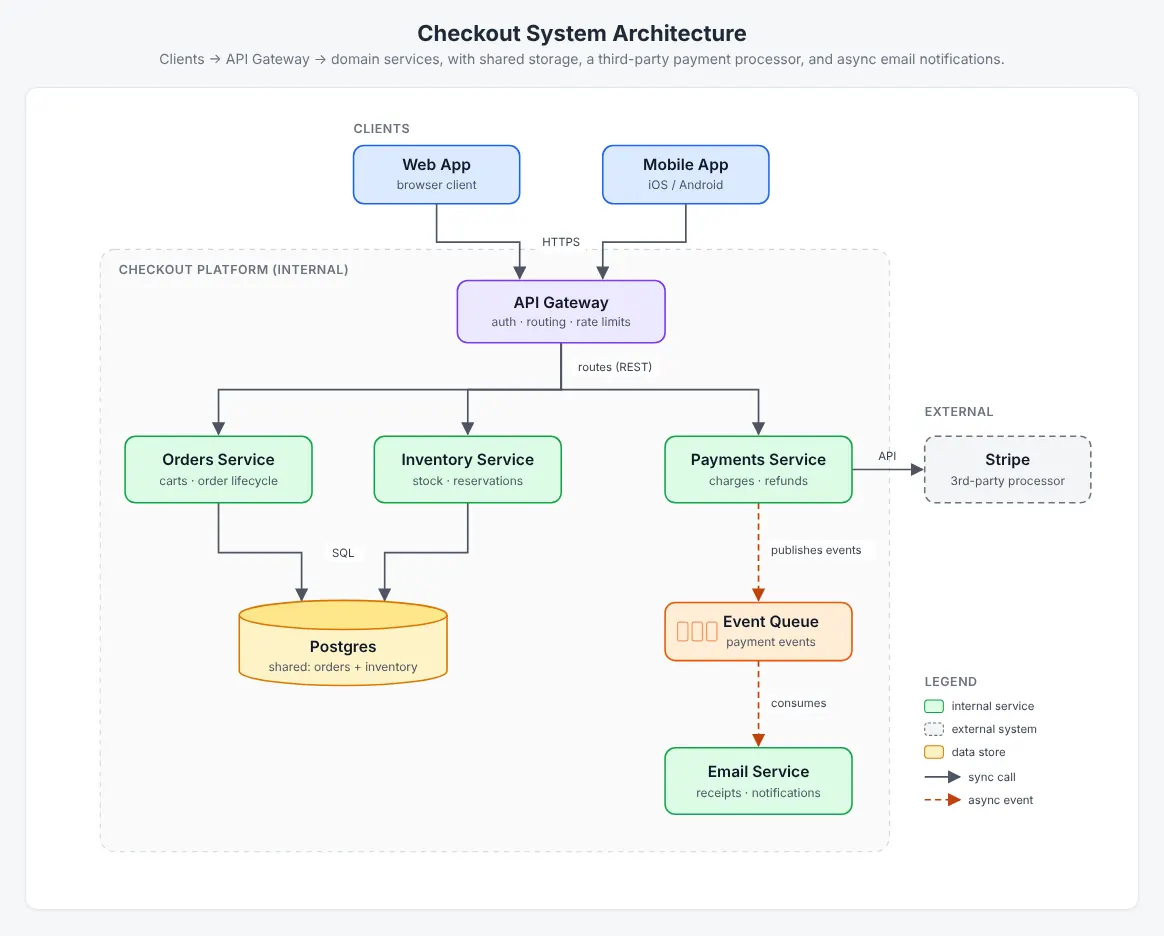
Both runs drew every component and connection we described, with no crossing lines, and both used dashed arrows for the asynchronous queue. The skill changed the look and the checking. With diagram-design, the diagram used the skill's own editorial style: grey paper, monospace labels, one highlighted payment path and a legend along the bottom. Claude also ran the skill's geometry checker, which found no problems. Without the skill, Claude drew a colourful boxes-and-arrows diagram that was just as accurate and loaded nothing from the internet. The skill's version loads Google Fonts, although we asked for a self-contained file. It took 2.5 times as long ($0.79 against $0.40).

  • InstallWorked6 s with the skills CLI
  • Picked up on its ownYesinvoked diagram-design
  • Time2 min 26 s59 s without the skill
  • API cost$0.79$0.40 without the skill
  • Output check16 KB, 1 media queries, 2 external URLsWithout: 8 KB, 0 media queries, 0 external URLs

The task, word for word

Make an architecture diagram of our checkout system as a single self-contained file, diagram.html: the web app and the mobile app call an API gateway; the gateway routes to the Orders, Payments and Inventory services; Payments talks to Stripe; Orders and Inventory share one Postgres database; Payments publishes events to a queue that the Email service reads. Don't ask me questions; make reasonable choices and finish.

With the skill

Architecture diagram made with diagram-design: grey background, monospace labels, Payments highlighted in orange, legend at the bottom

Without the skill

Architecture diagram made without the skill: coloured boxes for clients, services, Postgres, Stripe and the event queue, with a legend
diagram.html from each run. Both show the same ten components and links; the skill's version marks the payment path as the one focal element. Full size: with the skill, without.

With the skill

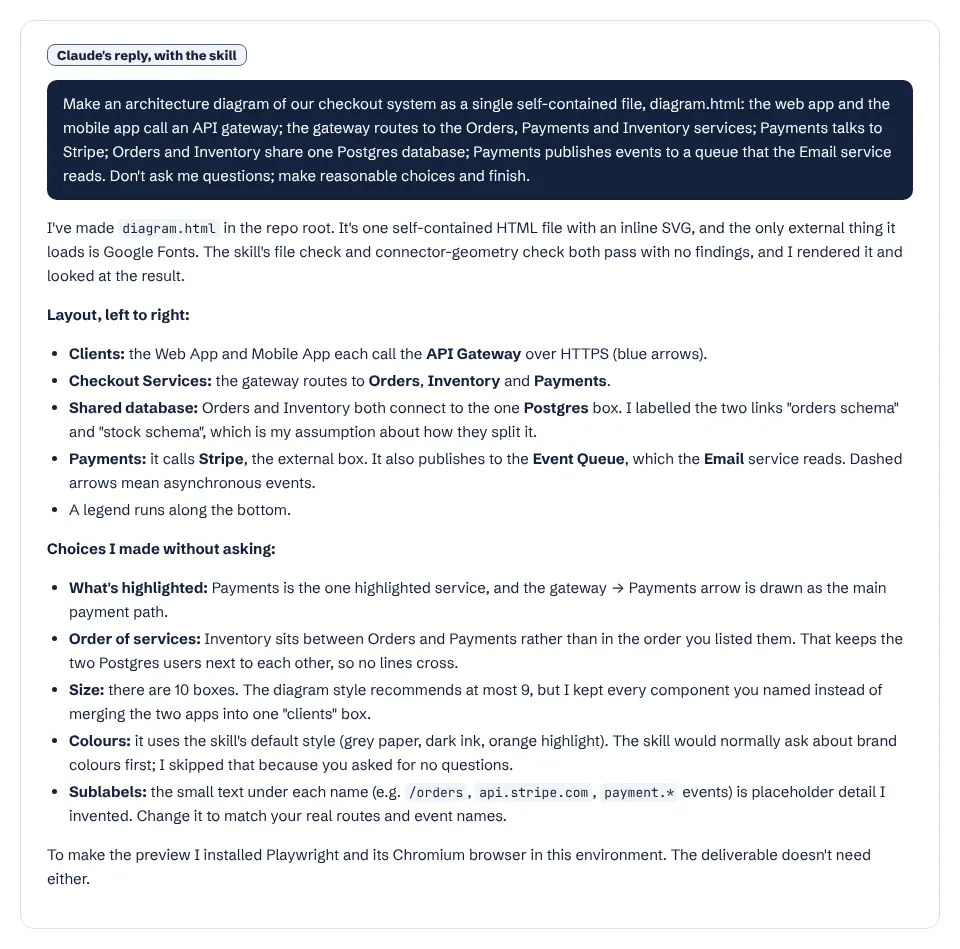
Claude's report with the skill, listing its layout choices and checks

Without the skill

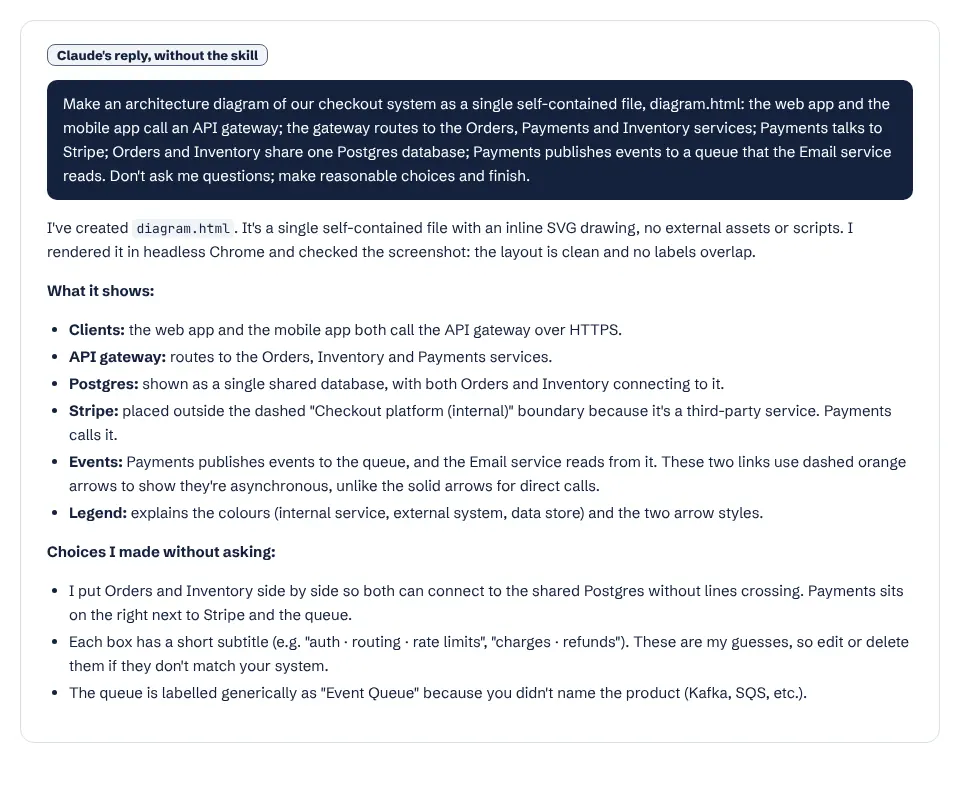
Claude's report without the skill
Claude's reports. With the skill it notes the diagram has 10 boxes, one more than the skill's recommended maximum of 9, and explains why it kept them. Full size: with the skill, without.

What it actually did

  1. Invoked the diagram-design skill unprompted.
  2. Skipped the skill's first-use step, which asks the user to set up brand colours, because we said not to ask questions, and used the default style.
  3. Read the skill's example architecture diagram and style guide, then generated the SVG with a short script.
  4. Ran the skill's verify_geometry.py and file checks (both clean) and looked at a rendered screenshot before finishing.

Where it helped

  • Follows a consistent house style with rules for labels, arrow gaps and a single focal element, so a set of diagrams will match.
  • Checked the drawing with a script, not just by eye.
  • Explained its layout choices, such as placing Inventory between Orders and Payments so the Postgres links do not cross.

Limits we hit

  • Plain Claude's diagram was just as accurate and readable.
  • Loads Google Fonts despite the request for a self-contained file; the skill has a documented fallback to system fonts when you ask for offline output.
  • 146 seconds and $0.79 against 59 seconds and $0.40.

Use it for

  • Teams that want every diagram in one consistent, brandable style (the skill can save brand profiles).
  • The many diagram types it covers beyond architecture: sequence, swimlane, Gantt, Sankey, Wardley maps and more.
  • Importing existing .drawio, Mermaid, Excalidraw or PlantUML diagrams into the same style.

One run with the skill and one without, same prompt, fresh folders, Claude Code 2.1.326 in headless mode. How we test skills. Every skill we have tested.

Last updated . The diagram-design skill is made and maintained by cathrynlavery; SkillsBot.org is an independent directory and is not affiliated with it.

Use diagram-design in Codex, Cursor and GitHub Copilot

diagram-design is a standard Agent Skills folder, so the same files work in other coding agents. Name the agent when you install:

Parts of a skill that rely on Claude Code features, such as subagents or / commands, may behave differently elsewhere. Paths for each agent are in our install guide.

diagram-design Skill facts

Author
cathrynlavery
Repository
cathrynlavery/diagram-design
License
MIT
Installs
29K
GitHub stars
67.3K
First seen on skills.sh
Apr 19, 2026
SKILL.md length
4,235 words
Other files
30

Security audits on skills.sh:

Installs, stars, first-seen date and audits from skills.sh on November 16, 2026. SKILL.md read from GitHub the same day.

What the diagram-design skill does

One design system. A style guide holds the colours and fonts (by default grey paper, dark ink and one orange accent, with Instrument Serif, Geist and Geist Mono). Accent colour goes on one or two focal elements only, and monospace is kept for technical text such as ports and URLs.

Brand first. Before the first diagram in a project, the skill checks whether the style guide still has the default colours and, if so, asks whether to apply your brand. It can save brand profiles for later.

A complexity budget. It aims for a density of 4 out of 10: at most 9 nodes and 12 arrows per diagram, and above 9 nodes it suggests splitting into two diagrams.

Connector rules, checked by script. Arrow labels are short, all caps and sit on a mask with a gap from the line. scripts/verify_geometry.py checks the finished file.

Imports and exports. Scripts extract existing .drawio, Mermaid, .excalidraw and PlantUML diagrams, and export SVG or PNG.

When it triggers

When you ask for any of the diagram types in its description, from architecture and ER diagrams to Gantt charts and user journeys.

Good to know

By default the diagrams load Google Fonts; ask for offline output or system fonts and the skill switches. It is MIT-licensed. See more cloud and DevOps skills.

What is in the diagram-design folder

  • SKILL.mdinstructions
  • assets/30 files

diagram-design Skill: FAQ

How do I install the diagram-design skill?

Run npx skills add cathrynlavery/diagram-design --skill diagram-design.

Can diagram-design use my brand colours?

Yes. On first use it offers to customise the style guide, and it can save named brand profiles.

What formats does it output?

Self-contained HTML with inline SVG, plus SVG or PNG exports. It can also import .drawio, Mermaid, Excalidraw and PlantUML files.